

↗
Competitor MovementsExpansion · Hiring · M&A activityTHE GLOBAL BUSINESS INTELLIGENCE PLATFORM
The Advantage of
knowing more
One connected platform to understand the companies, competitors, markets, relationships and opportunities shaping your business environment.
12 connected intelligence pillarsCompetitors, markets & relationshipsFrom signals to decisions
↗
Market DevelopmentsRegulation · Investment · Growth↗
Partnership OpportunitiesAlliances · Suppliers · New channels↗
Industry ShiftsTechnology · Demand · DisruptionTHE ADVANTAGE OF KNOWING MORE12 connected intelligence pillars. One clearer picture.
The Problem
A fragmented world creates a fragmented view.
Critical business information lives across different sources, formats and silos — making it hard to see the full picture.
Select any source card to explore the intelligence behind it
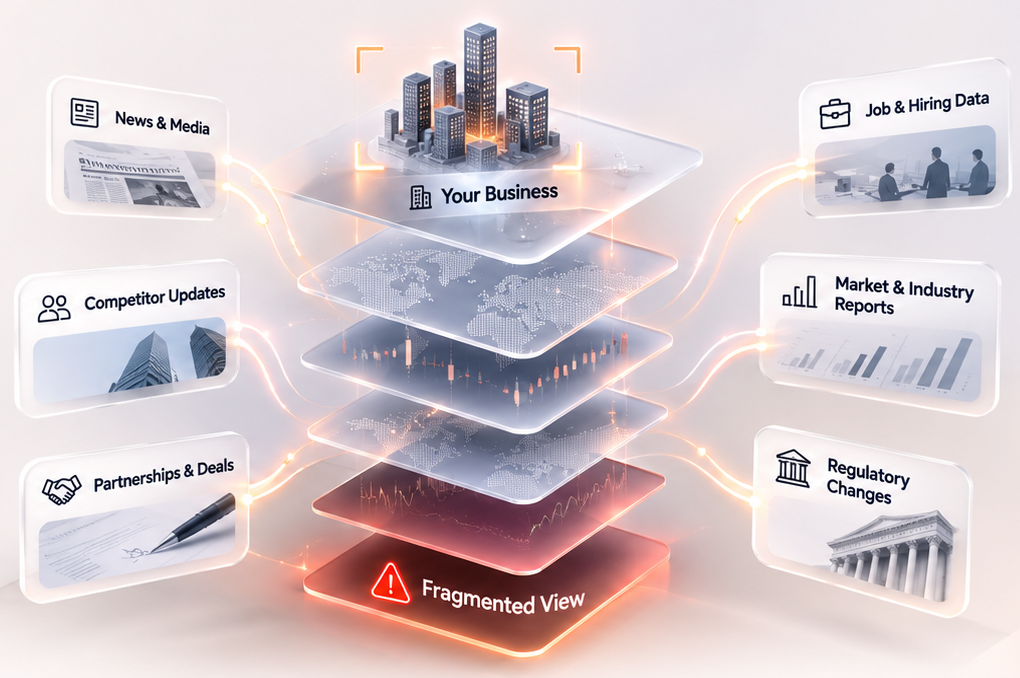 News and Media — explore RivalMap Insights
Competitor Updates — explore the RivalMap platform
Partnerships and Deals — explore business use cases
Job and Hiring Data — explore intelligence capabilities
Market and Industry Reports — explore RivalMap Insights
Regulatory Changes — explore connected intelligence
Fragmented InformationImportant signals are spread across multiple platforms and formats.See the connected platform ↗
Time Lost in CollectionTeams spend valuable time searching, verifying and consolidating information.Explore the intelligence approach ↗
Missed Signals & OpportunitiesEarly moves, partnerships and market shifts often go unnoticed.See business use cases ↗
The Cost of Blind Spots
What you don’t see
can cost you
more than you think.
When critical signals stay disconnected, decisions slow down, opportunities slip away and risks often surface too late.

Missed OpportunitiesPartnerships, new markets and growth signals go unnoticed.Explore business use cases ↗
Higher Competitive RiskCompetitors move faster, enter new spaces and capture advantage.See the competitive picture ↗
Slower DecisionsTeams spend more time collecting information than acting on it.Explore connected intelligence ↗
Increased Business CostLate insights often lead to costlier and reactive decisions.See how RivalMap helps ↗
The Realisation
But what if every
signal was
connected?
Business signals don’t exist in isolation. A hiring surge, a new partnership, a product launch and a market shift are often parts of the same story.
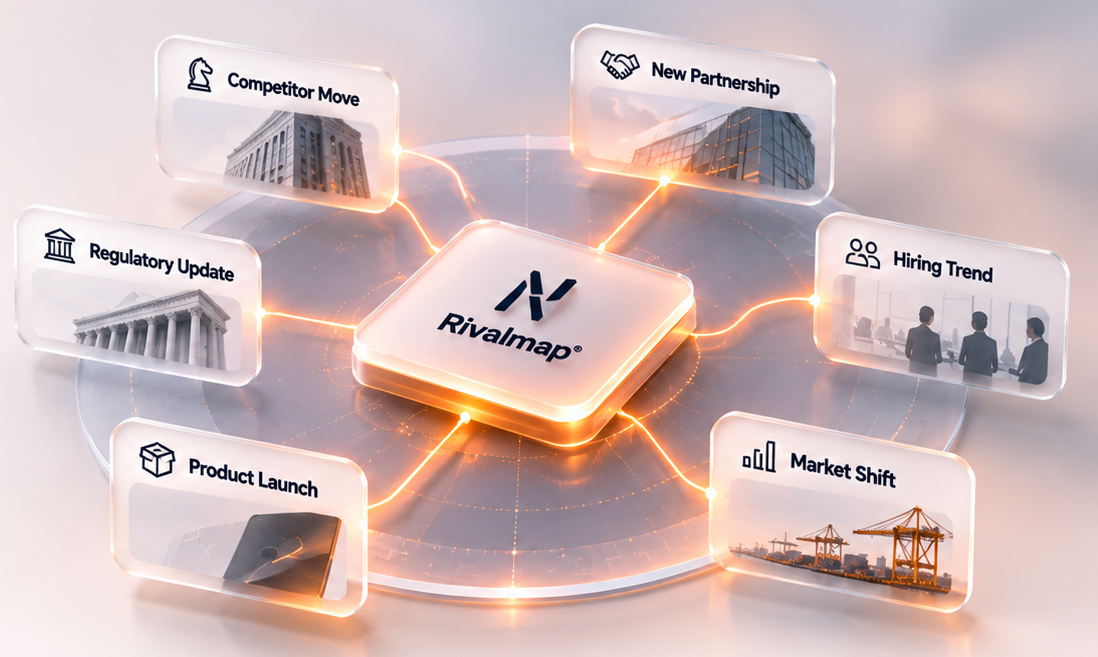
The Rivalmap Platform
One Platform. 12 Pillars.
Bring together diverse business signals, people, markets and movements into one unified intelligence platform.
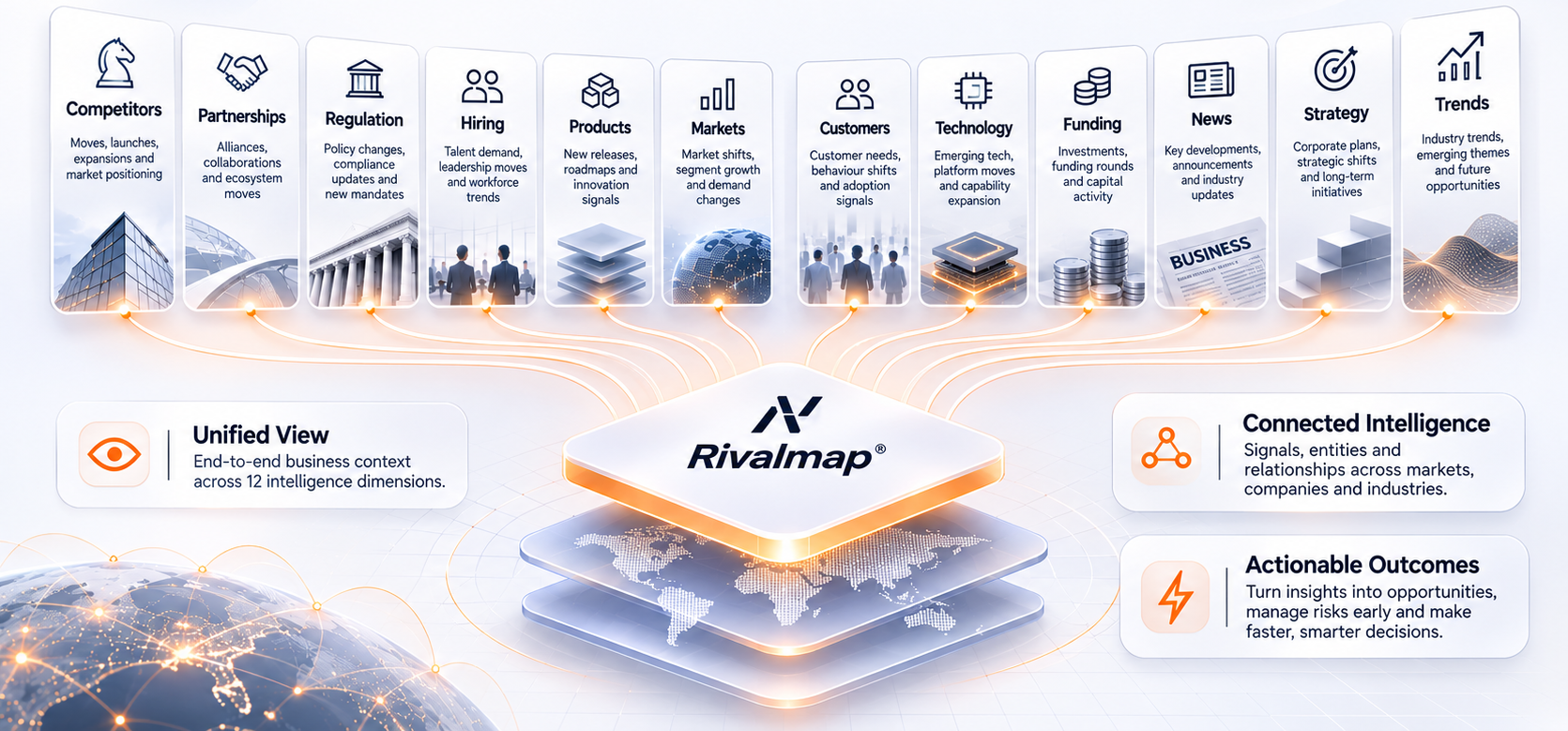 Competitors — explore all 12 capabilities
Partnerships — explore all 12 capabilities
Regulation — explore all 12 capabilities
Hiring — explore all 12 capabilities
Products — explore all 12 capabilities
Markets — explore all 12 capabilities
Customers — explore all 12 capabilities
Technology — explore all 12 capabilities
Funding — explore all 12 capabilities
News — explore all 12 capabilities
Strategy — explore all 12 capabilities
Trends — explore all 12 capabilities
Unified View — explore the RivalMap platform
Connected Intelligence — explore the platform
Actionable Outcomes — explore business use cases
06 / Explore the intelligence framework
Go Beyond Monitoring. Discover What It Means.
Choose a business perspective to see the signals worth watching, the developments that may matter and the next steps your team could consider. Each view connects to related areas of intelligence.
PILLAR 01 / COMPETITORS
ILLUSTRATIVE WORKSPACE
Competitor Intelligence
A useful competitor view goes beyond a list of names. It connects visible moves, product activity, market presence and strategic signals so teams can decide what deserves a closer look.
COMPETITORS
A connected business view
WHAT TO WATCH
IllustrativeSignal landscape
ExpansionNew markets and regions+
PositioningCompetitive movement+
ProductPortfolio activity+
Signal categories are illustrative examples, not live findings.
EXAMPLE SCENARIOS
Open an itemWhat changed?
A new market-entry signal appearsIllustrative development · Competitors+
Product and portfolio activity changesIllustrative development · Competitors+
Expansion patterns warrant a closer lookIllustrative development · Competitors+
RIVALMAP DECISION SUPPORT
SUGGESTED ACTION
Recommended starting point
Start with a dated competitor change log, then compare verified moves against your priority markets and product positions.
Why this matters: This creates an evidence trail before the team changes pricing, positioning or market plans.
01Build a competitor change logSuggested next move+
02Compare positioning and coverageSuggested next move+
03Set a focused watchlistSuggested next move+
Recommendations are illustrative guidance based on the selected intelligence area. Validate against current evidence and business context.Discuss this workflow ↗
COMPARATIVE INTELLIGENCE
Illustrative framework
Competitors landscape
Compare the wider landscape through consistent lenses. This is an evaluation framework, not a live ranking or a statement of confirmed market position.
01Established participants
Review current presence, breadth of activity and disclosed capabilities.
Landscape role02Focused specialists
Compare depth in a specific segment, capability or geography.
Landscape role03Emerging entrants
Check recent entry, expansion and new activity signals.
Landscape roleSELECT A COMPARISON LENS
3 lensesWhat should you compare?
01Market positioningOpen comparison guidance+
How to compare
Use the same definition, time window and geography for each participant. Attach the original source and date, and mark missing evidence rather than estimating it.
Comparison lens · Competitors02Portfolio overlapOpen comparison guidance+
How to compare
Use the same definition, time window and geography for each participant. Attach the original source and date, and mark missing evidence rather than estimating it.
Comparison lens · Competitors03Expansion activityOpen comparison guidance+
How to compare
Use the same definition, time window and geography for each participant. Attach the original source and date, and mark missing evidence rather than estimating it.
Comparison lens · CompetitorsSUGGESTED ANALYSIS
Discuss this workflow ↗
Build an evidence-led landscape
Compare participants using the same criteria. Record source, date and confidence for every material observation.
For Competitors · Suggested analytical approach, not an automated finding.
PILLAR 02 / PARTNERSHIPS
ILLUSTRATIVE WORKSPACE
Partnership & Alliance Intelligence
Partnership intelligence helps teams understand who is collaborating, what capabilities may be combined and how relationships can reshape routes to market.
PARTNERSHIPS
A connected business view
WHAT TO WATCH
IllustrativeSignal landscape
AllianceStrategic collaboration+
ChannelRoute to market+
EcosystemConnected organisations+
Signal categories are illustrative examples, not live findings.
EXAMPLE SCENARIOS
Open an itemWhat changed?
A collaboration announcement is publishedIllustrative development · Partnerships+
A channel relationship becomes visibleIllustrative development · Partnerships+
An ecosystem connection begins to take shapeIllustrative development · Partnerships+
RIVALMAP DECISION SUPPORT
SUGGESTED ACTION
Recommended starting point
Map the parties and purpose of each relationship, then assess whether it changes market access, capabilities or competitive positioning.
Why this matters: A relationship map makes it easier to spot ecosystem shifts and areas where a new partnership could matter.
01Map the relationship networkSuggested next move+
02Assess strategic fitSuggested next move+
03Identify partnership whitespaceSuggested next move+
Recommendations are illustrative guidance based on the selected intelligence area. Validate against current evidence and business context.Discuss this workflow ↗
COMPARATIVE INTELLIGENCE
Illustrative framework
Partnerships landscape
Compare the wider landscape through consistent lenses. This is an evaluation framework, not a live ranking or a statement of confirmed market position.
01Established participants
Review current presence, breadth of activity and disclosed capabilities.
Landscape role02Focused specialists
Compare depth in a specific segment, capability or geography.
Landscape role03Emerging entrants
Check recent entry, expansion and new activity signals.
Landscape roleSELECT A COMPARISON LENS
3 lensesWhat should you compare?
01Ecosystem reachOpen comparison guidance+
How to compare
Use the same definition, time window and geography for each participant. Attach the original source and date, and mark missing evidence rather than estimating it.
Comparison lens · Partnerships02Alliance coverageOpen comparison guidance+
How to compare
Use the same definition, time window and geography for each participant. Attach the original source and date, and mark missing evidence rather than estimating it.
Comparison lens · Partnerships03Channel overlapOpen comparison guidance+
How to compare
Use the same definition, time window and geography for each participant. Attach the original source and date, and mark missing evidence rather than estimating it.
Comparison lens · PartnershipsSUGGESTED ANALYSIS
Discuss this workflow ↗
Build an evidence-led landscape
Map each relationship by parties, purpose, geography and capability contributed before judging its strategic value.
For Partnerships · Suggested analytical approach, not an automated finding.
PILLAR 03 / REGULATION
ILLUSTRATIVE WORKSPACE
Regulatory Intelligence
Regulatory intelligence brings policy and compliance developments into business context, helping teams identify which changes merit review and who should assess them.
REGULATION
A connected business view
WHAT TO WATCH
IllustrativeSignal landscape
PolicyProposed changes+
ComplianceRequirements to review+
JurisdictionRegional developments+
Signal categories are illustrative examples, not live findings.
EXAMPLE SCENARIOS
Open an itemWhat changed?
A proposed policy update is publishedIllustrative development · Regulation+
A compliance requirement is revisedIllustrative development · Regulation+
New guidance appears in a relevant jurisdictionIllustrative development · Regulation+
RIVALMAP DECISION SUPPORT
SUGGESTED ACTION
Recommended starting point
Triage each regulatory development by jurisdiction, applicability and effective date before assigning a compliance review.
Why this matters: This reduces the risk of treating a proposal as a final obligation—or overlooking a change that does apply.
01Confirm applicabilitySuggested next move+
02Create an obligation reviewSuggested next move+
03Monitor the change lifecycleSuggested next move+
Recommendations are illustrative guidance based on the selected intelligence area. Validate against current evidence and business context.Discuss this workflow ↗
COMPARATIVE INTELLIGENCE
Illustrative framework
Regulation landscape
Compare the wider landscape through consistent lenses. This is an evaluation framework, not a live ranking or a statement of confirmed market position.
01Established participants
Review current presence, breadth of activity and disclosed capabilities.
Landscape role02Focused specialists
Compare depth in a specific segment, capability or geography.
Landscape role03Emerging entrants
Check recent entry, expansion and new activity signals.
Landscape roleSELECT A COMPARISON LENS
3 lensesWhat should you compare?
01Jurisdiction exposureOpen comparison guidance+
How to compare
Use the same definition, time window and geography for each participant. Attach the original source and date, and mark missing evidence rather than estimating it.
Comparison lens · Regulation02Compliance scopeOpen comparison guidance+
How to compare
Use the same definition, time window and geography for each participant. Attach the original source and date, and mark missing evidence rather than estimating it.
Comparison lens · Regulation03Policy changeOpen comparison guidance+
How to compare
Use the same definition, time window and geography for each participant. Attach the original source and date, and mark missing evidence rather than estimating it.
Comparison lens · RegulationSUGGESTED ANALYSIS
Discuss this workflow ↗
Build an evidence-led landscape
Compare applicability by jurisdiction and activity, then route material changes for qualified review.
For Regulation · Suggested analytical approach, not an automated finding.
PILLAR 04 / HIRING
ILLUSTRATIVE WORKSPACE
Talent & Workforce Intelligence
Hiring activity can reveal where organisations are building capability, expanding teams or changing priorities. The pattern matters more than any single vacancy.
HIRING
A connected business view
WHAT TO WATCH
IllustrativeSignal landscape
Talent demandRoles and skills+
LeadershipSenior appointments+
WorkforceCapability expansion+
Signal categories are illustrative examples, not live findings.
EXAMPLE SCENARIOS
Open an itemWhat changed?
Specialist roles appear in a new functionIllustrative development · Hiring+
A leadership position is announcedIllustrative development · Hiring+
Hiring activity broadens into another regionIllustrative development · Hiring+
RIVALMAP DECISION SUPPORT
SUGGESTED ACTION
Recommended starting point
Group hiring signals by skill and geography, then cross-check them against product, technology and market developments.
Why this matters: A cluster of roles can provide useful context, but corroboration helps distinguish a meaningful build-out from routine recruitment.
01Cluster roles by capabilitySuggested next move+
02Compare hiring with business movesSuggested next move+
03Validate before inferring intentSuggested next move+
Recommendations are illustrative guidance based on the selected intelligence area. Validate against current evidence and business context.Discuss this workflow ↗
COMPARATIVE INTELLIGENCE
Illustrative framework
Hiring landscape
Compare the wider landscape through consistent lenses. This is an evaluation framework, not a live ranking or a statement of confirmed market position.
01Established participants
Review current presence, breadth of activity and disclosed capabilities.
Landscape role02Focused specialists
Compare depth in a specific segment, capability or geography.
Landscape role03Emerging entrants
Check recent entry, expansion and new activity signals.
Landscape roleSELECT A COMPARISON LENS
3 lensesWhat should you compare?
01Talent availabilityOpen comparison guidance+
How to compare
Use the same definition, time window and geography for each participant. Attach the original source and date, and mark missing evidence rather than estimating it.
Comparison lens · Hiring02Capability overlapOpen comparison guidance+
How to compare
Use the same definition, time window and geography for each participant. Attach the original source and date, and mark missing evidence rather than estimating it.
Comparison lens · Hiring03Workforce movementOpen comparison guidance+
How to compare
Use the same definition, time window and geography for each participant. Attach the original source and date, and mark missing evidence rather than estimating it.
Comparison lens · HiringSUGGESTED ANALYSIS
Discuss this workflow ↗
Build an evidence-led landscape
Compare role clusters by skill, seniority and geography, then validate them against other business developments.
For Hiring · Suggested analytical approach, not an automated finding.
PILLAR 05 / PRODUCTS
ILLUSTRATIVE WORKSPACE
Product & Innovation Intelligence
Product intelligence follows what organisations bring to market and how their portfolios evolve, giving teams context for customer, positioning and innovation decisions.
PRODUCTS
A connected business view
WHAT TO WATCH
IllustrativeSignal landscape
LaunchesNew offerings+
PortfolioProduct changes+
InnovationDevelopment activity+
Signal categories are illustrative examples, not live findings.
EXAMPLE SCENARIOS
Open an itemWhat changed?
A new product or service is introducedIllustrative development · Products+
A portfolio or feature set is updatedIllustrative development · Products+
Innovation activity points to a new directionIllustrative development · Products+
RIVALMAP DECISION SUPPORT
SUGGESTED ACTION
Recommended starting point
Build a dated product-change comparison and connect each meaningful update to the customer segment it serves.
Why this matters: This helps product and commercial teams distinguish a headline launch from a change that could affect customer choice.
01Create a product comparisonSuggested next move+
02Track release changes over timeSuggested next move+
03Connect product and capability signalsSuggested next move+
Recommendations are illustrative guidance based on the selected intelligence area. Validate against current evidence and business context.Discuss this workflow ↗
COMPARATIVE INTELLIGENCE
Illustrative framework
Products landscape
Compare the wider landscape through consistent lenses. This is an evaluation framework, not a live ranking or a statement of confirmed market position.
01Established participants
Review current presence, breadth of activity and disclosed capabilities.
Landscape role02Focused specialists
Compare depth in a specific segment, capability or geography.
Landscape role03Emerging entrants
Check recent entry, expansion and new activity signals.
Landscape roleSELECT A COMPARISON LENS
3 lensesWhat should you compare?
01Portfolio overlapOpen comparison guidance+
How to compare
Use the same definition, time window and geography for each participant. Attach the original source and date, and mark missing evidence rather than estimating it.
Comparison lens · Products02Release activityOpen comparison guidance+
How to compare
Use the same definition, time window and geography for each participant. Attach the original source and date, and mark missing evidence rather than estimating it.
Comparison lens · Products03Feature differentiationOpen comparison guidance+
How to compare
Use the same definition, time window and geography for each participant. Attach the original source and date, and mark missing evidence rather than estimating it.
Comparison lens · ProductsSUGGESTED ANALYSIS
Discuss this workflow ↗
Build an evidence-led landscape
Use a consistent product comparison across target user, capability, availability and positioning.
For Products · Suggested analytical approach, not an automated finding.
PILLAR 06 / MARKETS
ILLUSTRATIVE WORKSPACE
Market Development Intelligence
Market intelligence helps teams see where conditions may be changing across regions, sectors and customer segments—and decide where more research is justified.
MARKETS
A connected business view
WHAT TO WATCH
IllustrativeSignal landscape
Market entryRegional expansion+
DemandSegment movement+
Industry shiftChanging conditions+
Signal categories are illustrative examples, not live findings.
EXAMPLE SCENARIOS
Open an itemWhat changed?
A new regional market signal emergesIllustrative development · Markets+
Demand patterns begin to shiftIllustrative development · Markets+
An adjacent segment attracts new activityIllustrative development · Markets+
RIVALMAP DECISION SUPPORT
SUGGESTED ACTION
Recommended starting point
Create a short market watchlist and define the evidence that would justify a deeper entry or expansion assessment.
Why this matters: This turns broad market monitoring into a clear decision about where to spend research time next.
01Prioritise markets for reviewSuggested next move+
02Build a market evidence packSuggested next move+
03Set trigger points for deeper researchSuggested next move+
Recommendations are illustrative guidance based on the selected intelligence area. Validate against current evidence and business context.Discuss this workflow ↗
COMPARATIVE INTELLIGENCE
Illustrative framework
Markets landscape
Compare the wider landscape through consistent lenses. This is an evaluation framework, not a live ranking or a statement of confirmed market position.
01Established participants
Review current presence, breadth of activity and disclosed capabilities.
Landscape role02Focused specialists
Compare depth in a specific segment, capability or geography.
Landscape role03Emerging entrants
Check recent entry, expansion and new activity signals.
Landscape roleSELECT A COMPARISON LENS
3 lensesWhat should you compare?
01Regional presenceOpen comparison guidance+
How to compare
Use the same definition, time window and geography for each participant. Attach the original source and date, and mark missing evidence rather than estimating it.
Comparison lens · Markets02Segment coverageOpen comparison guidance+
How to compare
Use the same definition, time window and geography for each participant. Attach the original source and date, and mark missing evidence rather than estimating it.
Comparison lens · Markets03Demand conditionsOpen comparison guidance+
How to compare
Use the same definition, time window and geography for each participant. Attach the original source and date, and mark missing evidence rather than estimating it.
Comparison lens · MarketsSUGGESTED ANALYSIS
Discuss this workflow ↗
Build an evidence-led landscape
Screen markets using consistent criteria for demand, competition, regulation and operational access.
For Markets · Suggested analytical approach, not an automated finding.
PILLAR 07 / CUSTOMERS
ILLUSTRATIVE WORKSPACE
Customer & Demand Intelligence
Customer and demand signals help teams understand who is buying, what needs are emerging and how commercial relationships may be changing across a market.
CUSTOMERS
A connected business view
WHAT TO WATCH
IllustrativeSignal landscape
DemandCustomer needs+
RelationshipsCommercial connections+
SentimentMarket-facing signals+
Signal categories are illustrative examples, not live findings.
EXAMPLE SCENARIOS
Open an itemWhat changed?
A customer need becomes more visibleIllustrative development · Customers+
A commercial relationship changesIllustrative development · Customers+
Demand signals emerge in an adjacent segmentIllustrative development · Customers+
RIVALMAP DECISION SUPPORT
SUGGESTED ACTION
Recommended starting point
Group customer signals by segment and need, then validate which patterns are strong enough to inform account or product priorities.
Why this matters: It helps teams move from isolated anecdotes to a more structured view of demand and relationships.
01Map customer and partner relationshipsSuggested next move+
02Validate demand patternsSuggested next move+
03Identify account questions to investigateSuggested next move+
Recommendations are illustrative guidance based on the selected intelligence area. Validate against current evidence and business context.Discuss this workflow ↗
COMPARATIVE INTELLIGENCE
Illustrative framework
Customers landscape
Compare the wider landscape through consistent lenses. This is an evaluation framework, not a live ranking or a statement of confirmed market position.
01Established participants
Review current presence, breadth of activity and disclosed capabilities.
Landscape role02Focused specialists
Compare depth in a specific segment, capability or geography.
Landscape role03Emerging entrants
Check recent entry, expansion and new activity signals.
Landscape roleSELECT A COMPARISON LENS
3 lensesWhat should you compare?
01Customer segmentsOpen comparison guidance+
How to compare
Use the same definition, time window and geography for each participant. Attach the original source and date, and mark missing evidence rather than estimating it.
Comparison lens · Customers02Relationship coverageOpen comparison guidance+
How to compare
Use the same definition, time window and geography for each participant. Attach the original source and date, and mark missing evidence rather than estimating it.
Comparison lens · Customers03Demand shiftsOpen comparison guidance+
How to compare
Use the same definition, time window and geography for each participant. Attach the original source and date, and mark missing evidence rather than estimating it.
Comparison lens · CustomersSUGGESTED ANALYSIS
Discuss this workflow ↗
Build an evidence-led landscape
Group customer signals by segment and need, then validate recurring patterns before changing priorities.
For Customers · Suggested analytical approach, not an automated finding.
PILLAR 08 / TECHNOLOGY
ILLUSTRATIVE WORKSPACE
Technology Intelligence
Technology intelligence connects public technology choices, technical hiring and product changes to help teams understand capability shifts and possible implications.
TECHNOLOGY
A connected business view
WHAT TO WATCH
IllustrativeSignal landscape
AdoptionTechnology choices+
EngineeringTechnical activity+
PlatformsCapability changes+
Signal categories are illustrative examples, not live findings.
EXAMPLE SCENARIOS
Open an itemWhat changed?
A technology adoption signal appearsIllustrative development · Technology+
Technical roles point to a capability buildIllustrative development · Technology+
A platform or engineering change is announcedIllustrative development · Technology+
RIVALMAP DECISION SUPPORT
SUGGESTED ACTION
Recommended starting point
Create an evidence-backed technology footprint and cross-check material changes against product and hiring activity.
Why this matters: The combined view helps separate routine technology mentions from capability changes that deserve technical review.
01Build a technology footprintSuggested next move+
02Connect technology to product movesSuggested next move+
03Prioritise areas for technical reviewSuggested next move+
Recommendations are illustrative guidance based on the selected intelligence area. Validate against current evidence and business context.Discuss this workflow ↗
COMPARATIVE INTELLIGENCE
Illustrative framework
Technology landscape
Compare the wider landscape through consistent lenses. This is an evaluation framework, not a live ranking or a statement of confirmed market position.
01Established participants
Review current presence, breadth of activity and disclosed capabilities.
Landscape role02Focused specialists
Compare depth in a specific segment, capability or geography.
Landscape role03Emerging entrants
Check recent entry, expansion and new activity signals.
Landscape roleSELECT A COMPARISON LENS
3 lensesWhat should you compare?
01Technology footprintOpen comparison guidance+
How to compare
Use the same definition, time window and geography for each participant. Attach the original source and date, and mark missing evidence rather than estimating it.
Comparison lens · Technology02Capability depthOpen comparison guidance+
How to compare
Use the same definition, time window and geography for each participant. Attach the original source and date, and mark missing evidence rather than estimating it.
Comparison lens · Technology03Adoption signalsOpen comparison guidance+
How to compare
Use the same definition, time window and geography for each participant. Attach the original source and date, and mark missing evidence rather than estimating it.
Comparison lens · TechnologySUGGESTED ANALYSIS
Discuss this workflow ↗
Build an evidence-led landscape
Build an evidence-backed technology footprint and cross-check it against product and hiring activity.
For Technology · Suggested analytical approach, not an automated finding.
PILLAR 09 / FUNDING
ILLUSTRATIVE WORKSPACE
Funding & Investment Intelligence
Funding and investment signals can add context to growth plans, ownership changes and strategic capacity. Their meaning depends on the source, structure and timing.
FUNDING
A connected business view
WHAT TO WATCH
IllustrativeSignal landscape
InvestmentCapital activity+
FundingFinancing events+
OwnershipStructural changes+
Signal categories are illustrative examples, not live findings.
EXAMPLE SCENARIOS
Open an itemWhat changed?
An investment announcement is madeIllustrative development · Funding+
A funding milestone becomes publicIllustrative development · Funding+
An ownership or capital change is disclosedIllustrative development · Funding+
RIVALMAP DECISION SUPPORT
SUGGESTED ACTION
Recommended starting point
Verify the event and parties first, then connect the capital signal to other disclosed strategic developments.
Why this matters: This avoids treating every financing headline as proof of expansion or financial strength.
01Verify the capital eventSuggested next move+
02Map ownership and relationshipsSuggested next move+
03Assess strategic relevanceSuggested next move+
Recommendations are illustrative guidance based on the selected intelligence area. Validate against current evidence and business context.Discuss this workflow ↗
COMPARATIVE INTELLIGENCE
Illustrative framework
Funding landscape
Compare the wider landscape through consistent lenses. This is an evaluation framework, not a live ranking or a statement of confirmed market position.
01Established participants
Review current presence, breadth of activity and disclosed capabilities.
Landscape role02Focused specialists
Compare depth in a specific segment, capability or geography.
Landscape role03Emerging entrants
Check recent entry, expansion and new activity signals.
Landscape roleSELECT A COMPARISON LENS
3 lensesWhat should you compare?
01Capital accessOpen comparison guidance+
How to compare
Use the same definition, time window and geography for each participant. Attach the original source and date, and mark missing evidence rather than estimating it.
Comparison lens · Funding02Investment activityOpen comparison guidance+
How to compare
Use the same definition, time window and geography for each participant. Attach the original source and date, and mark missing evidence rather than estimating it.
Comparison lens · Funding03Ownership structureOpen comparison guidance+
How to compare
Use the same definition, time window and geography for each participant. Attach the original source and date, and mark missing evidence rather than estimating it.
Comparison lens · FundingSUGGESTED ANALYSIS
Discuss this workflow ↗
Build an evidence-led landscape
Verify the event, parties and status first, then connect the capital signal to other disclosed developments.
For Funding · Suggested analytical approach, not an automated finding.
PILLAR 10 / NEWS
ILLUSTRATIVE WORKSPACE
Corporate News & Developments
News is the visible surface of business activity. The value comes from checking the original source, connecting the development and assessing what it changes.
NEWS
A connected business view
WHAT TO WATCH
IllustrativeSignal landscape
AnnouncementsOfficial updates+
LeadershipPublic statements+
DevelopmentsPublished signals+
Signal categories are illustrative examples, not live findings.
EXAMPLE SCENARIOS
Open an itemWhat changed?
An official announcement is releasedIllustrative development · News+
A public statement signals a changeIllustrative development · News+
A published development adds new contextIllustrative development · News+
RIVALMAP DECISION SUPPORT
SUGGESTED ACTION
Recommended starting point
Build a source-linked timeline and label each item as confirmed fact, interpretation or open question.
Why this matters: That gives decision-makers a traceable story instead of a pile of headlines.
01Separate source fact from interpretationSuggested next move+
02Connect developments into a timelineSuggested next move+
03Escalate only material changesSuggested next move+
Recommendations are illustrative guidance based on the selected intelligence area. Validate against current evidence and business context.Discuss this workflow ↗
COMPARATIVE INTELLIGENCE
Illustrative framework
News landscape
Compare the wider landscape through consistent lenses. This is an evaluation framework, not a live ranking or a statement of confirmed market position.
01Established participants
Review current presence, breadth of activity and disclosed capabilities.
Landscape role02Focused specialists
Compare depth in a specific segment, capability or geography.
Landscape role03Emerging entrants
Check recent entry, expansion and new activity signals.
Landscape roleSELECT A COMPARISON LENS
3 lensesWhat should you compare?
01Announcement themesOpen comparison guidance+
How to compare
Use the same definition, time window and geography for each participant. Attach the original source and date, and mark missing evidence rather than estimating it.
Comparison lens · News02Visibility and reachOpen comparison guidance+
How to compare
Use the same definition, time window and geography for each participant. Attach the original source and date, and mark missing evidence rather than estimating it.
Comparison lens · News03Narrative shiftsOpen comparison guidance+
How to compare
Use the same definition, time window and geography for each participant. Attach the original source and date, and mark missing evidence rather than estimating it.
Comparison lens · NewsSUGGESTED ANALYSIS
Discuss this workflow ↗
Build an evidence-led landscape
Keep a source-linked timeline and separate confirmed statements from interpretation and open questions.
For News · Suggested analytical approach, not an automated finding.
PILLAR 11 / STRATEGY
ILLUSTRATIVE WORKSPACE
Strategic Direction Intelligence
Strategic direction is rarely stated in one place. It is inferred carefully from a sequence of observable decisions, investments and organisational changes.
STRATEGY
A connected business view
WHAT TO WATCH
IllustrativeSignal landscape
PrioritiesStrategic focus+
PositioningMarket direction+
Operating modelOrganisational change+
Signal categories are illustrative examples, not live findings.
EXAMPLE SCENARIOS
Open an itemWhat changed?
A strategic priority becomes visibleIllustrative development · Strategy+
An operating model change is announcedIllustrative development · Strategy+
Several moves begin to point in one directionIllustrative development · Strategy+
RIVALMAP DECISION SUPPORT
SUGGESTED ACTION
Recommended starting point
Build an evidence map around one strategic hypothesis and actively test at least one alternative explanation.
Why this matters: It makes strategic interpretation more disciplined and easier for leadership teams to challenge.
01Create a strategy evidence mapSuggested next move+
02Test competing explanationsSuggested next move+
03Translate the assessment into a decisionSuggested next move+
Recommendations are illustrative guidance based on the selected intelligence area. Validate against current evidence and business context.Discuss this workflow ↗
COMPARATIVE INTELLIGENCE
Illustrative framework
Strategy landscape
Compare the wider landscape through consistent lenses. This is an evaluation framework, not a live ranking or a statement of confirmed market position.
01Established participants
Review current presence, breadth of activity and disclosed capabilities.
Landscape role02Focused specialists
Compare depth in a specific segment, capability or geography.
Landscape role03Emerging entrants
Check recent entry, expansion and new activity signals.
Landscape roleSELECT A COMPARISON LENS
3 lensesWhat should you compare?
01Strategic prioritiesOpen comparison guidance+
How to compare
Use the same definition, time window and geography for each participant. Attach the original source and date, and mark missing evidence rather than estimating it.
Comparison lens · Strategy02Operating modelOpen comparison guidance+
How to compare
Use the same definition, time window and geography for each participant. Attach the original source and date, and mark missing evidence rather than estimating it.
Comparison lens · Strategy03Investment directionOpen comparison guidance+
How to compare
Use the same definition, time window and geography for each participant. Attach the original source and date, and mark missing evidence rather than estimating it.
Comparison lens · StrategySUGGESTED ANALYSIS
Discuss this workflow ↗
Build an evidence-led landscape
Build an evidence map around one strategic hypothesis and actively test an alternative explanation.
For Strategy · Suggested analytical approach, not an automated finding.
PILLAR 12 / TRENDS
ILLUSTRATIVE WORKSPACE
Emerging Trends Intelligence
Trend intelligence looks for repeated signals across sources, organisations and markets. It helps teams decide which patterns deserve attention—and which may be noise.
TRENDS
A connected business view
WHAT TO WATCH
IllustrativeSignal landscape
Emerging themesNew topics+
PatternsRepeated activity+
MomentumDeveloping signals+
Signal categories are illustrative examples, not live findings.
EXAMPLE SCENARIOS
Open an itemWhat changed?
A recurring theme appears across sourcesIllustrative development · Trends+
Activity gathers around an emerging topicIllustrative development · Trends+
A pattern extends into another marketIllustrative development · Trends+
RIVALMAP DECISION SUPPORT
SUGGESTED ACTION
Recommended starting point
Cluster repeated signals, test their source independence and define what evidence would move a theme onto the watchlist.
Why this matters: This helps teams identify emerging patterns without overstating what a small number of observations can prove.
01Cluster signals by themeSuggested next move+
02Test for independent confirmationSuggested next move+
03Create a trend watchlistSuggested next move+
Recommendations are illustrative guidance based on the selected intelligence area. Validate against current evidence and business context.Discuss this workflow ↗
COMPARATIVE INTELLIGENCE
Illustrative framework
Trends landscape
Compare the wider landscape through consistent lenses. This is an evaluation framework, not a live ranking or a statement of confirmed market position.
01Established participants
Review current presence, breadth of activity and disclosed capabilities.
Landscape role02Focused specialists
Compare depth in a specific segment, capability or geography.
Landscape role03Emerging entrants
Check recent entry, expansion and new activity signals.
Landscape roleSELECT A COMPARISON LENS
3 lensesWhat should you compare?
01Emerging themesOpen comparison guidance+
How to compare
Use the same definition, time window and geography for each participant. Attach the original source and date, and mark missing evidence rather than estimating it.
Comparison lens · Trends02Signal recurrenceOpen comparison guidance+
How to compare
Use the same definition, time window and geography for each participant. Attach the original source and date, and mark missing evidence rather than estimating it.
Comparison lens · Trends03Cross-market spreadOpen comparison guidance+
How to compare
Use the same definition, time window and geography for each participant. Attach the original source and date, and mark missing evidence rather than estimating it.
Comparison lens · TrendsSUGGESTED ANALYSIS
Discuss this workflow ↗
Build an evidence-led landscape
Cluster repeated signals, test source independence and define what evidence would move a theme onto the watchlist.
For Trends · Suggested analytical approach, not an automated finding.07 / THE STANDARD
A conclusion should show its workNever ask your team to trust a black box.
A useful brief makes it clear what was observed, what was connected and what remains a hypothesis. Your team should be able to inspect the trail behind the interpretation.
What the source actually says.
A dated announcement, filing, job listing, company-page change or other public development.
What else belongs in the picture.
Related organisations, people, markets, relationships and developments that add context to the original signal.
What it may mean—and what to test.
A qualified implication, the evidence behind it and the next question or action worth investigating.
Observed fact is not the same as inferred intent. RivalMap’s job is to help your team see the distinction—and make a better-informed decision.
08 / YOUR NEXT MOVE
The advantage of knowing moreThe market won’t wait for your next report.
Bring us the competitor, market or business question you are trying to answer. We’ll show you how RivalMap can help uncover the clues, examine the evidence and decide what deserves attention.
Request a Private Demo ↗A focused walkthrough. Your business questions. No generic pitch.